

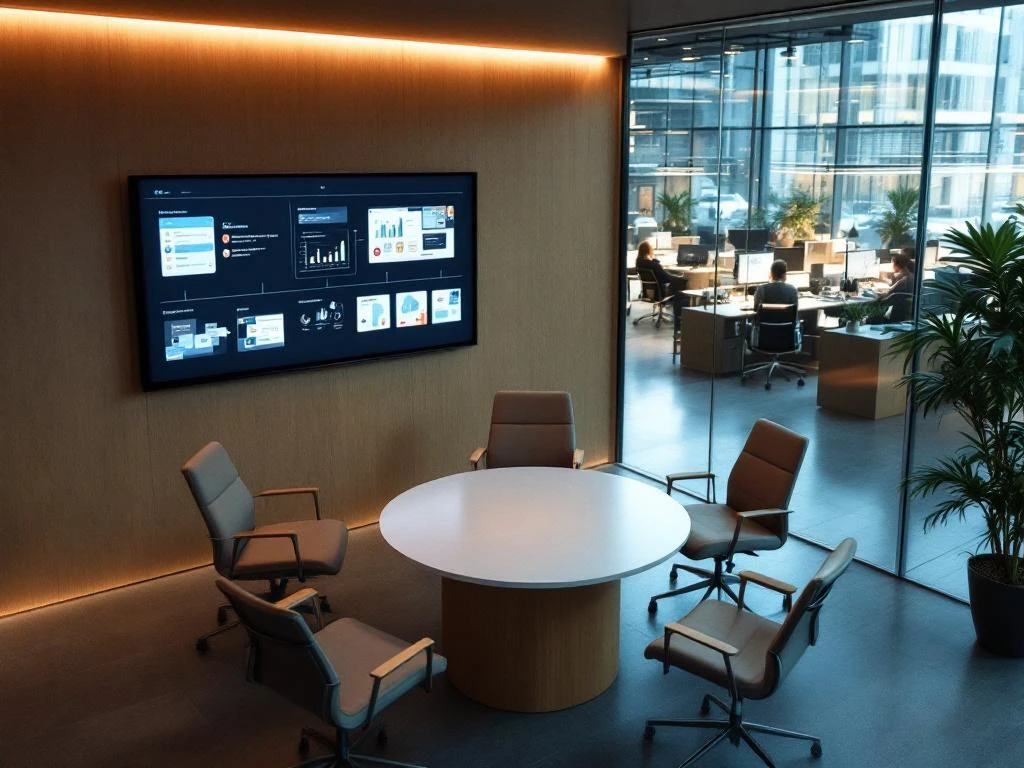
A huddle room is a small, informal meeting space designed for teams of 2–6 people who want to collaborate or discuss matters quickly. These compact spaces are equipped with modern technology for both in-person and virtual meetings. Huddle rooms have become essential for modern offices because they encourage spontaneous collaboration and are perfectly suited to hybrid work models. They provide privacy for small-scale discussions and make efficient use of available office space.
What is a huddle room, and why does every office need one?
A huddle room is a small, technologically equipped meeting space specifically designed for informal and spontaneous meetings with small teams. Unlike traditional boardrooms, huddle rooms are compact, accessible, and designed to facilitate quick decision-making and creative collaboration.
These spaces are characterized by their accessibility and modern technical equipment. They typically feature a large screen, wireless presentation capabilities, and video conferencing equipment, allowing teams to seamlessly switch between in-person meetings and virtual collaboration with remote colleagues.
Modern offices need huddle rooms because work patterns have changed. Hybrid work requires flexible spaces that support both in-person and digital collaboration. Smart office technology makes it possible to manage these spaces intelligently, with sensors that automatically adjust lighting and climate control when the space is in use.
How big should a huddle room be, and how many people can it accommodate?
An ideal huddle room has an area of 10–15 square meters and comfortably seats 4–6 people. For teams of 2–3 people, a space of 8–10 square meters is often sufficient, while larger huddle rooms of up to 20 square meters are suitable for groups of up to 8 people.
The layout of the space is crucial to its functionality. Allow at least 1.5 meters between the table and the wall where the screen is mounted, so that presentations are clearly visible. Around the table, you’ll need about 60 centimeters of space per person for comfortable seating and movement.
Practical guidelines for the layout:
- Choose a round or oval table to encourage better interaction
- Place the screen at eye level across from the entrance
- Make sure there are enough electrical outlets and data connections
- Take natural light and ventilation into account
What technology and equipment do you need in a huddle room?
A fully equipped huddle room requires an integrated audiovisual system consisting of a large screen (55–75 inches), a wireless presentation solution, a video conferencing camera, and high-quality microphones and speakers. This technology must work together seamlessly to enable hybrid meetings.
The basic technical equipment includes a smart display that can connect directly to laptops and mobile devices via wireless connections. Video conferencing systems must be compatible with popular platforms such as Microsoft Teams, Google Meet, and Zoom to ensure maximum flexibility.
Smart office technology can further enhance the user experience with automated systems that prepare the space when a meeting begins. This includes automated lighting, climate control, and even the activation of the appropriate technical systems based on calendar integration.
Essential technical components:
- All-in-one video conferencing system with built-in camera and audio
- Wireless presentation adapter for easy screen sharing
- A stable internet connection with sufficient bandwidth
- User-friendly control panels or app integration
What is the difference between a huddle room and a traditional meeting room?
The main difference lies in size, accessibility, and intended use. Huddle rooms are designed for 2–6 people and informal, spontaneous meetings, while traditional meeting rooms can accommodate 8–20 people for formal presentations and lengthy discussions.
From a technological standpoint, huddle rooms are often equipped with more advanced, user-friendly systems that boot up quickly and are easy to operate. Traditional meeting rooms typically have more complex AV systems that require more preparation.
The layout also differs significantly. Huddle rooms have a cozy, informal atmosphere that encourages creativity and open communication. Traditional meeting rooms are designed to be more formal, with a focus on presentations and hierarchical communication.
When it comes to reservations, huddle rooms are often available for spontaneous use or short-term bookings, whereas traditional meeting rooms usually need to be reserved in advance for longer periods.
How do you set up a huddle room for maximum productivity?
A productive huddle room combines ergonomic furniture, optimal lighting, and soundproofing in an inspiring environment. Start with comfortable chairs that provide good support during shorter meetings, and choose a table that’s large enough for laptops and notepads without feeling cramped.
Lighting plays a crucial role in productivity. Combine natural light with adjustable LED lighting that is suitable for both in-person meetings and video conferencing. Avoid glare on screens and ensure even light distribution.
Acoustics are essential for effective communication. Use sound-absorbing materials, such as acoustic wall panels or soft upholstery, to prevent echoes and keep conversations private. This is especially important in open-plan office environments.
The use of color can influence mood and creativity. Choose warm, neutral colors as a base, with a few accent colors to add energy. Add plants for a natural look and better air quality.
How Wout Monseurs helps with huddle room solutions
We deliver turnkey huddle room projects, from design to installation, integrating smart office technology with ergonomic furniture to create optimal workspaces. Our approach combines over 60 years of experience in office design with modern smart office technology.
Our huddle room solutions include:
- Custom design, tailored to your space and work processes
- Integration of audiovisual systems and video conferencing technology
- Ergonomic furniture from high-quality brands such as Interstuhl
- Smart office systems for automatic climate and lighting control
We ensure that your huddle rooms integrate seamlessly with your existing IT infrastructure and office environment. From the initial concept to final delivery, we oversee the entire process, including user training and maintenance of the technical systems.
Discover how we can transform your office with smart huddle room solutions. Contact us for a no-obligation consultation to discuss your specific needs and options.
Frequently asked questions
How do I book a huddle room, and can I use it on short notice?
Most modern huddle rooms can be used either on the spot or through a reservation system. Many offices use digital displays at the door that show availability and allow for quick bookings via an app or touchscreen. For on-the-spot use, you can often check immediately whether the room is available using smart sensors that detect occupancy.
What is the cost of setting up a fully equipped huddle room?
A fully equipped huddle room costs between €8,000 and €25,000, depending on the technology and furniture selected. Basic models with a smart display and wireless presentation capabilities start at around €8,000, while premium solutions with advanced video conferencing and smart office integration can cost up to €25,000. The investment pays for itself through increased productivity and more efficient use of space.
What common mistakes should I avoid when setting up a huddle room?
Common mistakes include underestimating the importance of soundproofing, which can result in conversations being heard in adjacent rooms, and positioning the screen incorrectly, which causes reflections. People also often fail to take ventilation into account in small spaces and don’t provide enough outlets for all devices. Therefore, always seek professional advice to ensure optimal results.
How can I ensure that the huddle room technology remains user-friendly for all colleagues?
Choose intuitive, one-touch systems that start up automatically when someone enters the room. Provide clear instructions on a wall poster or digital display, and train key users who can assist others. Use familiar platforms such as Teams or Zoom, and provide a help desk number for technical support in case of any issues.
Can I convert an existing small meeting room into a huddle room?
Yes, most small meeting rooms can be converted into modern huddle rooms. The main changes usually involve upgrading the audiovisual technology, improving the acoustics, and adjusting the lighting for video conferencing. Be sure to check whether the room has adequate ventilation and whether the electrical setup is suitable for the new equipment.
How do I maintain the technology in a huddle room, and what is its lifespan?
Plan maandelijkse controles van de audiovisuele systemen en houd software up-to-date via automatische updates. De meeste technologie heeft een levensduur van 5-7 jaar, waarbij displays en camera’s het langst meegaan. Sluit een onderhoudscontract af voor complexere systemen en train gebruikers in basis troubleshooting. Vervang filters van ventilatie- en projectorensystemen volgens de fabrieksrichtlijnen.
What benefits does a huddle room offer hybrid teams with remote workers?
Huddle rooms enable seamless transitions between in-person and virtual participants through high-quality video conferencing technology. Remote workers can fully participate in brainstorming sessions and decision-making, while office-based employees can collaborate flexibly. The technology ensures a consistent experience for all participants and prevents remote workers from feeling left out during important meetings.