

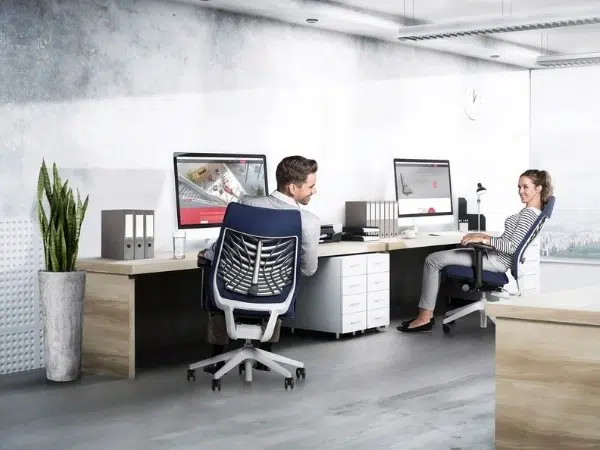
Wat houdt ergonomisch werken precies in? Ergonomisch werken draait om een werkwijze waarbij lichamelijke klachten zo veel mogelijk voorkomen worden. Deze lichamelijke klachten ontstaan op de werkplek bijvoorbeeld door een verkeerde zithouding, of ongeschikt meubilair. Ook zelf kun je uiteraard bijdragen aan een ergonomische werkwijze. Daarom geven we in deze blog diverse tips om optimaal te kunnen werken. Met deze 7 tips voorkom je lichamelijke klachten en maak je het werkleven direct een stuk aangenamer.
1. Ergonomische bureaustoelen
Ergonomisch werken begint bij goed zitten. Je zit op de gemiddelde werkdag al snel 8 uur aan je bureau te werken. Je kunt natuurlijk letten op een optimale zithouding, maar een van de belangrijkste factoren is het meubilair zelf. Door te kiezen voor een ergonomische bureaustoel weet je zeker dat je lichaam de juiste ondersteuning krijgt tijdens het zitten. Het prettige aan ergonomische bureaustoelen: er zijn uitgebreide mogelijkheden om de stoel naar wens te verstellen. Zo stel je de stoel optimaal in voor je lengte en zithouding. Bovendien bevatten de luxere modellen vaak diverse mechanismen waardoor de stoel natuurlijk meebeweegt met je lichaam. Geniet van een comfortabele zithouding en de juiste ondersteuning en je zult merken dat de lichamelijke klachten snel zullen verdwijnen.
2. Ga voor een ergonomisch bureau
Naast de stoel waar je op zit is er nog een belangrijke factor om ergonomisch te kunnen werken: het bureau. Het is belangrijk om een bureau te hebben die voor jou op de juiste werkhoogte afgesteld staat. Dat zorgt er ook voor dat je beeldscherm zich op een prettige hoogte bevindt en zorgt ervoor dat je armen comfortabel kunnen rusten op het blad. Ga een stap verder in je ergonomische werkwijze door te kiezen voor een zit-sta bureau. Deze ergonomische bureaus zorgen ervoor dat je het lange zitten kunt doorbreken. Met een eenvoudige handeling stel je het bureau in op de gewenste hoogte. Schuif regelmatig je bureaustoel even opzij en kies ervoor om staand verder te werken. Door zitten en staan af te wisselen bevorder je de doorbloeding en bescherm je je spieren en gewrichten.
3. Juiste werkhouding
Heb je de keuze gemaakt voor ergonomische kantoormeubelen? Dan is het belangrijk om ook op de juiste wijze gebruik te maken van je nieuwe meubilair. Zo dienen je voeten stevig op de grond te staan, waarbij je benen in de juiste zithoogte een hoek van 90° maken. Ook je armen horen te rusten op de armleggers in een hoek van 90°. Voor de optimale afstelling van je bureaustoel en bureau biedt Wout Monseurs zitadvies. Zo weet je zeker dat je optimaal kunt profiteren van je ergonomische werkplek.
4. Kies de juiste accessoires
De juiste accessoires kunnen je ergonomische werkplek compleet maken. Denk bijvoorbeeld aan speciale ergonomische muizen, ontworpen om vingerklachten, polsklachten en nekklachten te voorkomen. Ook voor de hoogte van je monitor zijn diverse mogelijkheden beschikbaar. Maak je gebruik van een vast beeldscherm, dan kan een monitorarm uitkomst bieden. Daarmee verstel je je monitor tot een hoogte en positie die voor jou optimaal is. Voor laptops biedt een laptopstandaard uitkomst. Daardoor komt je laptop in een hoek te staan en wordt deze op een betere hoogte gepositioneerd.
5. Beweeg voldoende
We omschreven het al bij de ergonomische bureaus: afwisseling in houding is goed. Daarom is het belangrijk om regelmatig je beweging te pakken. Voorkom dat je te lang achtereen zit of staat door kleine handelingen uit te voeren. Kom minstens eens per uur even in beweging: haal zelf je koffie, stel die vraag aan je collega eens direct aan zijn/haar bureau in plaats van een mailtje te sturen. Of ga naar het toilet op een andere verdieping. Zo voorkom je dat je te lang achter elkaar zit of stil staat en geef je je lichaam de nodige beweging.
6. Drink genoeg water
Voldoende water drinken zorgt ervoor dat de afvalstoffen in je lichaam sneller afgevoerd kunnen worden. Drink op een dag minstens twee liter. Een bijkomend voordeel van veel water drinken? Je zult regelmatiger op moeten staan om het toilet te bezoeken. En dat draagt weer bij aan het voldoende bewegen tijdens je werkdag. Win-win dus!
7. Minder blauw licht en felle beeldschermen
Langdurig naar een beeldscherm kijken kan gezondheidsklachten opleveren. Vooral de ogen hebben het zwaar te verduren, en kunnen droog en/of vermoeid aanvoelen. Voorkom dat je beeldscherm te fel is, zorg dat deze in balans is met het lichtniveau van je werkomgeving. Daarnaast stralen beeldschermen blauw licht uit. Dit blauwe licht kan een negatieve invloed op je welzijn hebben. Zo hindert blauw licht de aanmaak van melatonine, die ervoor zorgt dat je je slaperig begint te voelen in de avond. Te veel blootstelling aan blauw licht, zeker ‘s avonds kan dus invloed hebben op je dag- en nachtritme.
Zeker in de donkere winterdagen en de dagen waarop je langer doorwerkt kan het verstandig zijn om de blootstelling aan blauw licht te beperken. Voor computers zijn daar handige apps voor, zoals F.lux, die de hoeveelheid blauw licht reguleren afhankelijk van de tijd van de dag. Op smartphones en tablets zit tegenwoordig ook vaak een nachtmodus, die blauw licht filtert. Hoe zorg jij voor een ergonomische werkplek waar je lekker kunt werken zonder gezondheidsklachten? Voor advies rondom ergonomische meubels ben je van harte welkom in onze showroom in Breda.